Connect Rewardata to Microsoft Power Platform
Pull standardised pay, tax, living-wage, retirement and cost-of-living data for 200+ countries straight into your Power Automate flows, Power Apps, Logic Apps, Copilot Studio agents and ChatGPT Custom GPTs — no scraping, one consistent API.
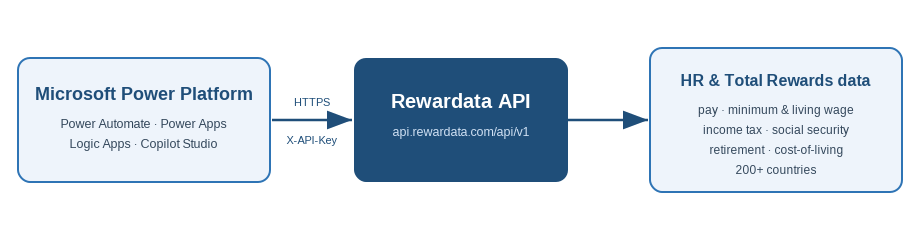
Before you start
https://api.rewardata.com/api/v1 — HTTPS only.
Send your key in the X-API-Key header. Every data call needs a valid, approved key — without one (or while your account is still on the waiting list) /data returns 401 and no values. The catalogue endpoints (/countries, /fields, /categories) are public.
Three ways to connect
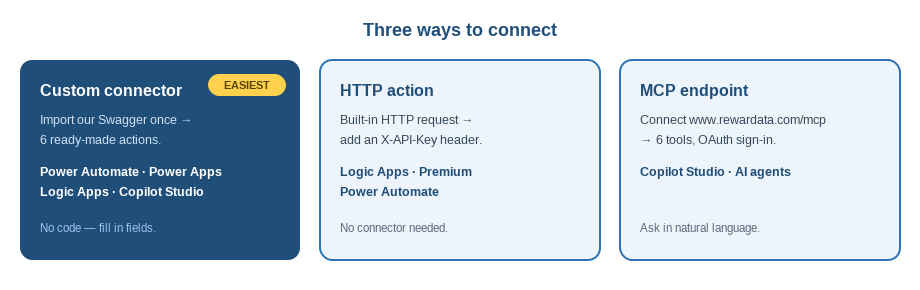
The custom connector is the easiest — import it once and you get six ready-made
actions (QueryData, BulkQuery, plus country/year/category/field pickers).
The generic HTTP action needs no connector. Copilot Studio can also
talk to our hosted MCP endpoint in natural language.
- Download the connector definition: rewardata-power-automate.swagger.json.
- In Power Automate (or Power Apps), go to Data → Custom connectors → New custom connector → Import an OpenAPI file, and upload the file.
- Review — host
api.rewardata.com, securityAPI Key (X-API-Key)— then Create connector. - Create a connection: paste your
rwd_…API key when prompted. Done — the actions are now available in any flow/app.
Automate look-ups in any flow — e.g. when a new hire is added, fetch the country's living wage and effective tax rate.
With the connector
- Add a step → search Rewardata → pick QueryData.
- Fill in country (e.g.
DEU), field (e.g.living_wage_net_monthly), year. - Use the returned
valuein later steps (Excel, SharePoint, Teams, email).
Without a connector (HTTP action)
Method:  GET
URI:     https://api.rewardata.com/api/v1/data?country=DEU&field=living_wage_net_monthly
Headers: X-API-Key: rwd_your_keySurface live country data inside a canvas app — e.g. a relocation calculator.
- In your app, Data → Add data → Connectors → choose your Rewardata custom connector.
- Call an action from a control. Example formula on a button/label:
// returns the rows for the chosen country/field
ClearCollect(
    rewards,
    Rewardata.QueryData({country: cmbCountry.Selected.Value,
                         field: "average_monthly_earnings"}).value
)For server-side / IT-owned integrations. Two options:
- HTTP action — add an HTTP action with method
GET, the URL above, and anX-API-Keyheader. No connector needed. - OpenAPI import — Logic Apps can consume our spec directly: api.rewardata.com/openapi.json (or the downloaded Swagger).
Bulk: one call for many rows
POST https://api.rewardata.com/api/v1/bulk-query
X-API-Key: rwd_your_key
Content-Type: application/json

{ "queries": [
    {"country":"USA","field":"income_tax_rate_at_average_wage","year":2025},
    {"country":"FRA","field":"income_tax_rate_at_average_wage","year":2025}
] }Let your own Copilot Studio agent answer reward questions in natural language, with every figure sourced and dated. Add Rewardata as an MCP tool in about two minutes:
- In your agent, open Tools → Add a tool → New tool → Model Context Protocol.
- Fill in Server name
Rewardata, Server URLhttps://www.rewardata.com/mcpand this Server description: "Official country-level statistics on pay, minimum wage, income tax, social security, statutory leave, working time, pensions, inflation, cost of living, exchange rates and expatriate allowances, each with source, year and confidence. Use for any HR, pay, tax, benefits or labour-market statistic by country and year." - Choose OAuth 2.0 → Dynamic discovery, so each colleague signs in with their own
Rewardata account. Or choose API key → Header with header name
X-API-Key, and each colleague pastes their own key when they create the connection. - Paste our recommended agent instructions into the agent's Instructions. They tell the agent to answer from Rewardata only, pick the right field and cite source and year.
The agent then has ten tools (search_fields, query_hr_data, query_batch, get_time_series, compare_countries…) and can answer e.g. "compare the minimum wage in Poland, Spain and Portugal."
Prefer a custom connector? Import the
MCP connector definition
in Power Apps (Custom connectors → Import an OpenAPI file). The REST connector above also works as a
Copilot tool (QueryData). CLI clients use the same endpoint with
Authorization: Bearer rwd_your_key — see Connect via MCP.
Give a Custom GPT live access to Rewardata so it answers reward questions with real numbers. Custom GPTs use an OpenAPI schema (an "Action") plus your API key — paste the schema, set the key, done.
- Create a GPT — in ChatGPT, open Explore GPTs → Create, then the Configure tab.
- Add an Action — under Actions → Create new action, in the Schema box click Import from URL and paste
https://rewardata.com/static/connectors/rewardata-openai-actions.json
(or download it below and paste the JSON directly). - Authentication — choose API Key, Auth Type: Custom, Header name
X-API-Key, and paste yourrwd_…key. - Save & test — ask e.g. "What's the statutory minimum wage in Germany, and how does it compare to France and Spain?"
Paste this into the GPT's Instructions
You are a Total Rewards assistant with live access to the
Rewardata API (pay, tax, social security, cost of living,
living wage, hours, leave, pensions and FX for 200+ countries).

- To find exact codes, call listCountries, listCategories
  and listFields before querying.
- Use queryData for one value (country + field [+ year]);
  use bulkQuery to compare many countries/fields at once.
- For currency conversion, call fxRate.
- Always report the value with its unit, year and source.
- Never invent numbers. If the API returns nothing, say so.
Prefer MCP? ChatGPT's Connectors / Deep Research (Pro, Team, Enterprise) can connect to our hosted MCP server at https://www.rewardata.com/mcp instead — see the MCP section. MCP can't be pasted into a Custom GPT; Custom GPTs use the Action schema above.
Pull it straight into Excel (Power Query)
Excel's built-in Power Query (Get & Transform) pulls the API into a refreshable table — no add-in, no code project. Go to Data → Get Data → From Other Sources → Blank Query → Advanced Editor, paste the query, then Close & Load. Re-pull anytime with Data → Refresh All.
- Get your key from your profile (
rwd_…). - Paste the query opposite into the Advanced Editor — your key goes in the
X-API-Keyheader. - Close & Load → it becomes a table you can Refresh on demand.
For many countries/fields in one go, point it at POST /api/v1/bulk-query.
Note: =WEBSERVICE() only works for the public catalogue endpoints — it can't send the
X-API-Key header that /data needs.
let
    Source = Json.Document(
        Web.Contents(
            "https://rewardata.com/api/v1/data?country=DEU&field=average_annual_wage",
            [Headers=[#"X-API-Key"="rwd_your_key_here"]]
        )
    ),
    rows  = Source[data],
    table = Table.FromList(rows, Splitter.SplitByNothing()),
    out   = Table.ExpandRecordColumn(table, "Column1",
              {"country","year","value","unit","source_name"})
in
    out
The key is saved inside the workbook — keep the file personal (or store the key via Power Query's Data source settings), and rotate it if a shared workbook leaks.
A typical flow

"Cost a new role in any country." Trigger on a new SharePoint/Excel row → call
QueryData (or /snapshot for everything at once) to pull the average wage,
effective income tax, living wage and statutory on-costs → write the fully-loaded number back to the row.
Tip: GET /api/v1/snapshot returns every country with its currency and the most-used
fields in a single call — ideal for refreshing a whole reference table on a schedule.
Downloads & references
- Power Automate connector (Swagger)
- ChatGPT Custom GPT — OpenAPI Actions schema
- Copilot Studio — MCP connector (Swagger)
- Copilot agent — recommended instructions
- OpenAPI spec (for Logic Apps / custom connectors)
- Interactive API docs
- Data dictionary — every field name + description
Troubleshooting
- 401 Unauthorized — check the connection's API key (
X-API-Keyheader). - 401 / no data back — the request has no valid key, or the account isn't approved yet (e.g. still on the waiting list). Check the
X-API-Keyheader and that your account is active. - 429 / rate limit — free tier is 60/min · 250/day; use
/bulk-queryor/snapshotto reduce calls. - Field names — copy exact codes from the dictionary.
Ready to build?
Grab your API key and the connector — you'll have data flowing in minutes.
Get an API key Download the connector